
Best for
Solo creators, runners, cyclists, skiers and travelers who want fast deployment and automated follow shots without learning conventional stick controls.
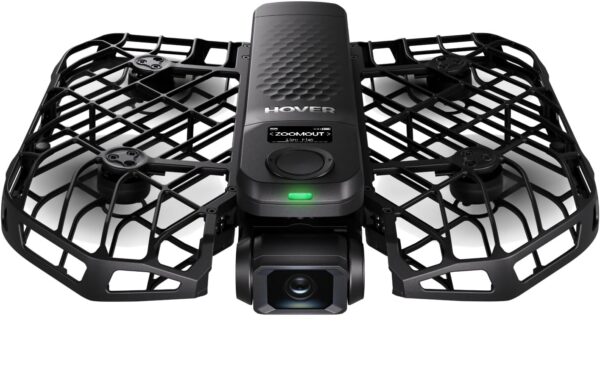




The HOVERAir X1 PRO Standard is a 192 g self-flying camera with automated subject tracking, horizontal 4K/60 video, vertical 2.7K/60 recording and a protected foldable design for sports and solo filming.
The HOVERAir X1 PRO Standard is a compact self-flying camera designed for people who want automated tracking without carrying a conventional drone controller. Its strongest use cases are running, cycling, skiing, hiking and other activities where quick palm launch, subject tracking and a protected foldable design matter more than long flight times or traditional aerial-photography controls.
This exact Standard configuration includes the X1 PRO and one Smart Battery. It delivers horizontal 4K video at up to 60 fps, vertical 2.7K video at up to 60 fps, a two-axis mechanical gimbal with electronic stabilization and specialized tracking modes for faster activities. Its principal limitations are a 16-minute controlled-condition maximum flight time, one included battery and rear-only proximity sensing rather than full omnidirectional obstacle avoidance.
Best for
Solo creators, runners, cyclists, skiers and travelers who want fast deployment and automated follow shots without learning conventional stick controls.
Not ideal for
Long filming sessions on one battery, unrestricted flight through dense obstacles, professional 10-bit workflows or buyers who expect a controller and charging hub in the base package.
Verify before buying
Confirm that the Standard configuration still includes the aircraft and one Smart Battery, and determine whether you also need a charging hub, spare battery, Beacon, JoySticks or compatible microSD card.
The verified Amazon package identifies two primary items:
This is the entry configuration, not the Basic, Cycling, Fly Joy or Skiing combo. The verified box contents do not list a Beacon, JoySticks, charging hub, power adapter, carrying case, second battery or activity-specific accessories. Check the current retailer package before ordering because marketplace contents can change.
The Standard package is still fully usable for the X1 PRO’s controller-free automatic flight modes. Optional accessories become more important when the buyer wants additional batteries, faster multi-battery charging, a live-view controller, manual directional input or a more complete cycling or skiing setup.
| Specification | X1 PRO |
|---|---|
| Weight | 192 g with battery |
| Folded dimensions | 105 × 149 × 34 mm |
| Maximum flight time | Up to 16 minutes under manufacturer test conditions |
| Maximum auto-follow speed | Up to 42 km/h or 26 mph under manufacturer test conditions |
| Camera sensor | 1/2-inch |
| Horizontal video | Up to 4K at 60 fps |
| Vertical video | Up to 2.7K at 60 fps |
| Slow motion | 1080p at 100 or 120 fps |
| Stabilization | Two-axis mechanical gimbal with EIS and horizon leveling |
| Field of view | 104 degrees |
| Collision sensing | Rear ToF proximity sensor; downward vision positioning and ToF |
| Internal storage | 32 GB with microSD expansion support up to 1 TB |
| Included battery | One 1,920 mAh, 14.17 Wh Smart Battery |
| Waterproofing | Not waterproof |
The X1 PRO is built around automated subject filming rather than adapting a conventional camera drone to occasional tracking. It supports controller-free launch and automated paths such as Follow, Dolly Track, Zoom Out and Orbit. Current firmware also provides activity-specific Cycling and Ski modes intended to account for faster movement and the visual challenges associated with riding and snow-covered terrain.
The manufacturer specifies a maximum auto-follow speed of 42 km/h or 26 mph in controlled conditions. That does not guarantee reliable tracking at that speed on every trail, in every wind condition or around every obstacle. Buyers should test the selected mode at reduced speed on the actual route before committing to a full run.
The PRO records horizontal 4K video at up to 60 fps and 1080p slow motion at up to 120 fps. It also supports vertical 2.7K recording at up to 60 fps. SmoothCapture 2.0 combines a two-axis mechanical gimbal, electronic stabilization and horizon leveling to reduce the movement normally associated with compact automated cameras.
The PRO is not simply a discounted PROMAX. It uses a smaller 1/2-inch sensor, records a maximum of 4K rather than 8K, stores 32 GB internally rather than 64 GB and records JPEG photos rather than the PROMAX model’s additional RAW option. Its rear sensing consists of a ToF proximity sensor without the PROMAX model’s added rear vision sensor.
At 192 g with its battery installed, the folded X1 PRO is easier to carry than a traditional camera drone, controller and separate equipment bag. The enclosed propeller design and palm-based deployment also reduce setup friction when the goal is capturing several short clips rather than conducting a long aerial-photography flight.
The X1 PRO does not provide complete omnidirectional obstacle avoidance. Its active collision system uses a rear ToF proximity sensor, while downward sensors assist positioning. Thin branches, wires, reflective surfaces, poor lighting, abrupt elevation changes and obstacles outside the sensor coverage can still cause a collision or tracking failure.
OmniTerrain helps the aircraft maintain positioning over surfaces such as snow, water and uneven terrain, but it does not make the X1 PRO waterproof. HOVERAir instructs users to enable OmniTerrain and maintain at least 1.5 meters of height when flying over water. Salt spray, rain, immersion and wet snow remain legitimate equipment risks.
Automated tracking also does not transfer responsibility from the operator to the aircraft. Select an appropriate route, maintain visual line of sight, avoid non-participants and moving vehicles, and be prepared to stop or recover the aircraft when conditions change.
The Standard package includes one battery, and the manufacturer’s maximum flight-time specification is 16 minutes under controlled conditions. Actual usable recording time can be lower because of wind, speed, temperature, repeated launches and the need to land with a safe reserve. A spare battery is the most useful first accessory for buyers planning more than a few short clips.
HOVERAir specifies approximately 55 minutes for in-aircraft charging and approximately 45 minutes for one battery using the optional charging hub. The hub can charge two batteries in approximately 60 minutes under the stated charging setup. The Standard Amazon box contents do not confirm that the hub or a power adapter is included.
The X1 PRO includes 32 GB of internal storage and supports compatible microSD cards up to 1 TB. A card is not required for initial use, but expandable storage becomes valuable when recording repeated 4K sports sessions. Card speed and compatibility still matter, so verify the manufacturer’s current supported-media guidance before purchasing a large-capacity card.
The automated flight modes can be launched without a conventional controller or smartphone. The Hover X1 app adds configuration, media transfer, preview and manual-control functions. Buyers wanting a dedicated live display, longer control link, Return-to-Home controls or manual directional input can add the optional Beacon and JoySticks.
These accessories change the control experience, but they are not required merely to use the automatic follow modes. The Standard package is therefore the appropriate starting point for buyers who primarily want palm-launched tracking and are comfortable adding batteries or controls only after determining what their activity requires.
For filming below freezing, the regular Smart Battery should not be confused with the optional Thermo Smart Battery. Consult the current temperature and warm-up instructions before using either battery in winter conditions.
The 192 g aircraft is below the FAA’s 250 g registration threshold when flown exclusively under the Exception for Limited Recreational Operations. That weight does not exempt the operator from airspace restrictions, visual-line-of-sight requirements, TRUST requirements or other applicable rules.
All drones operated under Part 107 must be registered regardless of weight. HOVERAir has added built-in Remote ID support to the X1 PRO through compatible aircraft firmware and app versions. Buyers planning Part 107 operations should update the system, locate the Remote ID serial number in the app and verify that the specific aircraft is accepted during FAA registration before relying on it for commercial work.
Use the product page for the purchase decision and the guides below for deeper research.
Update HOVERAir X1 PRO firmware with preparation, app steps, restart checks and safe responses to missing updates, stalled installation or connection errors.
Learn HOVERAir X1 PRO hand launch and palm landing, with mode settings, firmware checks, safe hand placement and common mistakes to avoid.
Understand HOVERAir X1 PRO storage, calculate recording time from free space, and manage your original files safely before clearing the camera.
Transfer HOVERAir X1 PRO videos by phone Wi-Fi or computer USB. Follow the copy steps, preserve recorded sound, and check files before deleting originals.
Set up HOVERAir X1 PRO action tracking for skiing, cycling and hiking. Choose modes, check route clearance and plan safe stopping and recovery.
The HOVERAir X1 PRO is one of the strongest choices for runners, cyclists, skiers, hikers and solo creators who want a camera to follow them without stopping to fly a conventional drone.
The HOVERAir X1 PRO Standard is the right configuration for buyers who want a capable follow-me sports camera without paying upfront for accessories they may not use. Its combination of automated tracking, 4K/60 recording, compact weight and activity-specific modes makes it a stronger fit for solo action footage than a conventional camera drone without reliable subject tracking.
Buyers should enter with realistic expectations: one battery limits session length, the aircraft is not waterproof, and the PRO has rear proximity sensing rather than complete obstacle avoidance. If those limitations match the intended route and activity, the Standard package provides the core X1 PRO experience with the fewest unnecessary extras.
No controller is identified in the verified Standard package contents. The aircraft can perform its automatic flight modes without a controller, while the app, Beacon and JoySticks provide additional control options.
The verified Amazon Standard package includes one X1 PRO Smart Battery. Additional batteries and the charging hub are separate unless the retailer changes the package.
It has rear ToF proximity sensing and downward positioning sensors, but it does not provide full omnidirectional obstacle avoidance. Route selection and operator supervision remain important.
No. OmniTerrain can improve positioning over water and other difficult surfaces, but it does not waterproof the aircraft. HOVERAir specifies maintaining at least 1.5 meters above water with OmniTerrain enabled.
It generally does not require registration when flown exclusively under the U.S. recreational exception. Part 107 operations require registration regardless of weight, and all other applicable flight and airspace rules still apply.
The X1 PRO records up to 4K/60, uses a 1/2-inch sensor, has 32 GB of internal storage and uses rear ToF proximity sensing. The PROMAX adds a larger sensor, up to 8K video, 64 GB of storage, RAW photography and an additional rear vision sensor.
Specifications checked August 21, 2026 against the official HOVERAir X1 PRO specifications. U.S. registration guidance was checked against the FAA drone-registration requirements, and Remote ID support was checked against HOVERAir’s Remote ID instructions.
| Brand | HOVERAir |
|---|---|
| Model | X1 PRO |
| Configuration | Standard |
| Product Type | Self-flying follow-me camera |
| Package Contents | 1 X1 PRO aircraft; 1 Smart Battery |
| Weight | 192 g with battery |
| Folded Dimensions | 105 × 149 × 34 mm |
| Unfolded Dimensions | 173 × 149 × 39 mm |
| Max Flight Time | Up to 16 minutes under manufacturer test conditions |
| Max Auto-Follow Speed | Up to 42 km/h (26 mph) under manufacturer test conditions |
| Camera Sensor | 1/2-inch |
| Photo Resolution | 12 MP JPEG |
| Video Resolution | 4K up to 60 fps; vertical 2.7K up to 60 fps |
| Slow Motion | 1080p at 100 or 120 fps |
| Gimbal | 2-axis mechanical gimbal with EIS and horizon leveling |
| Field of View | 104° |
| Max Video Bitrate | 100 Mbps at 4K/60 fps |
| Video Format | MP4 with H.264 or H.265 |
| Obstacle Sensing | Rear ToF proximity sensor; downward vision positioning and ToF |
| Internal Storage | 32 GB |
| Expandable Storage | microSD support up to 1 TB |
| Battery | 1920 mAh 14.17 Wh Li-Po Smart Battery |
| Charging Time | About 55 minutes in aircraft; optional hub about 45 minutes for one battery |
| Wind Resistance | Up to 10.7 m/s (24 mph), Level 5 |
| Flight Operating Temperature | -10°C to 45°C |
| Waterproof | No |
| App | Hover X1 app for iOS and Android |
| Controller Compatibility | Controller-free automatic modes; optional app, Beacon and JoySticks |
| Wi-Fi | Wi-Fi 5 |
| Remote ID | Built-in support with compatible firmware; verify aircraft serial eligibility |
The verified X1 PRO Standard package includes the aircraft and one Smart Battery. A Beacon, JoySticks and conventional controller are not listed as included components.
The aircraft can launch from the user’s palm and perform supported automatic flight paths without a separate controller. Select the intended mode, confirm that the aircraft has recognized the subject and begin with a low-speed test in an open area.
Install the current Hover X1 app for activation, firmware updates, flight-mode configuration, camera settings, media transfer, preview and supported manual controls. App and firmware behavior changes over time, so complete available updates before evaluating tracking performance or Remote ID.
The Beacon adds a dedicated display and additional communication and Return-to-Home controls. Attaching the optional JoySticks provides one-handed or two-handed manual-control configurations. These accessories are useful for more deliberate filming but are not necessary for the basic controller-free follow modes.
Automatic tracking can lose a subject or encounter an obstacle. Keep the aircraft within visual line of sight, understand how to stop or recover the selected flight mode and do not depend on rear proximity sensing to identify every hazard.
The verified Standard configuration contains one 1,920 mAh Smart Battery. HOVERAir lists up to 16 minutes of flight time under controlled conditions, so buyers planning repeated sports runs should expect a spare battery to be the first practical upgrade.
HOVERAir specifies approximately 55 minutes for in-aircraft charging. The separately available charging hub can charge one battery in approximately 45 minutes or two batteries in approximately 60 minutes when used with the recommended charging equipment. Verify whether a USB-C cable or power adapter is included in the current retailer package before assuming the Standard kit is a complete charging station.
The included Smart Battery is not the optional Thermo Smart Battery. Buyers planning skiing or other sub-freezing use should review the current HOVERAir battery-temperature instructions and determine whether the Thermo version is required for the expected conditions.
The X1 PRO includes 32 GB of internal storage and supports compatible microSD cards up to 1 TB. Use media that meets HOVERAir’s current compatibility and speed recommendations, especially for sustained high-resolution recording.
At 192 g, the X1 PRO may qualify for the FAA registration exception only when it is flown exclusively under the limited recreational exception. Part 107 aircraft must be registered regardless of weight. Registration status does not replace airspace authorization, visual-line-of-sight, flight-over-people or other operating requirements.
HOVERAir provides built-in Remote ID support for the X1 PRO with compatible firmware and app versions. Before Part 107 registration, update the system and verify that the Remote ID serial number appears in the app and is accepted for the specific aircraft.


