The BETAFPV Aquila20 HD is the better choice if a clear 1080p goggle view and higher-quality flight recordings matter more than keeping the initial cost down. Choose the analog Aquila20 if you want the simpler, less expensive route into FPV and broader access to conventional 5.8 GHz analog gear. Their flying hardware and beginner progression are otherwise remarkably similar, so paying more for the HD kit mainly buys a different camera, video transmitter, and pair of goggles.
This is a research-based comparison using current BETAFPV specifications, package lists, goggle documentation, compatibility notes, and product manuals. No hands-on test notes were supplied, so manufacturer ratings are identified as such and are not presented as measured results.
Quick verdict
Choose Aquila20 analog
You want the lower-cost complete kit, prefer the familiar behavior and broad compatibility of 5.8 GHz analog video, or expect to buy inexpensive analog whoops later.
Choose Aquila20 HD
You value a 1920 by 1080 goggle screen, 1080p at 60 fps DVR recording, a cleaner live image, and the ArtLynk P1 ecosystem enough to accept the higher kit cost.
No major flight-time advantage
BETAFPV rates both versions for about 10 minutes and gives them the same motors, propellers, 2S battery, wheelbase, flight controller, and N/S/M modes.
Verify before buying
Confirm the goggles say VR04 or VR04 HD, check whether the drone uses the analog VTX or P1 Air Unit, and select the intended Mode 1 or Mode 2 transmitter version.
BETAFPV Aquila20 FPV Kit
Featured gear
BETAFPV Aquila20 FPV Kit
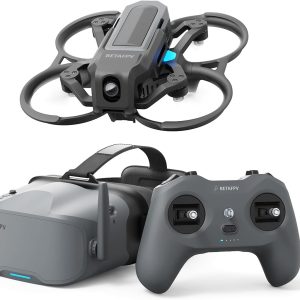
The BETAFPV Aquila20 FPV Kit is a complete analog RTF system with a 122 g brushless whoop, ExpressLRS LiteRadio 4 SE transmitter, VR04 DVR goggles, assisted N mode, Manual mode, and approximately ten-minute manufacturer-rated…
The BETAFPV Aquila20 FPV Kit is a complete analog RTF system with a 122 g brushless whoop, ExpressLRS LiteRadio 4 SE transmitter, VR04 DVR goggles, assisted N mode, Manual mode, and approximately ten-minute manufacturer-rated flights.
- Best for
- Best for a beginner who wants a complete analog FPV learning kit with assisted…
- Skill level
- Beginner to Intermediate
- Product type
- Beginner Drones, Drones, Under 249g Drones
- Best for
- A beginner who wants a complete analog FPV learning kit with assisted hovering, simulator-compatible…
- Skill level
- Beginner to Intermediate
- Product type
- Analog Ready-to-Fly FPV Whoop Kit
BETAFPV Aquila20 HD FPV Kit
Featured gear
BETAFPV Aquila20 HD FPV Kit
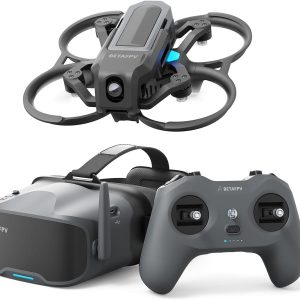
The BETAFPV Aquila20 HD is a complete digital RTF FPV kit with a 1080p P1 video feed, assisted hovering, manual flight modes and protected propellers. Best for: Beginners who want clearer digital video and…
The BETAFPV Aquila20 HD is a complete digital RTF FPV kit with a 1080p P1 video feed, assisted hovering, manual flight modes and protected propellers.
- Best for
- A beginner-oriented digital RTF kit with assisted flight, protected propellers and a clear 1080p…
- Skill level
- Beginner to Advanced Training
- Product type
- Beginner Drones, Beginner FPV Kits, Drones, Under 249g Drones
- Best for
- A beginner-oriented digital RTF kit with assisted flight, protected propellers and a clear 1080p…
- Skill level
- Beginner to Advanced Training
- Product type
- Digital HD RTF FPV Whoop Kit
BETAFPV Aquila20 HD vs analog: differences at a glance
The names make these kits sound like different generations, but the official specifications show that most of the aircraft and radio system are shared. The standard BETAFPV Aquila20 FPV Kit sends conventional analog video to VR04 goggles. The BETAFPV Aquila20 HD FPV Kit replaces that video chain with BETAFPV's P1 digital air unit and VR04 HD goggles.
| Decision factor | Aquila20 analog | Aquila20 HD |
|---|---|---|
| Video system | 5.8 GHz analog VTX | ArtLynk P1 digital air unit |
| Included goggles | VR04 | VR04 HD, not VR04 HD Pro |
| Camera | C04, 1/3-inch CMOS | P1 camera, 1/2.9-inch CMOS |
| Goggle display | 4.3-inch, 800 by 480 | 4.5-inch, 1920 by 1080 |
| Goggle recording | 480p at 30 fps | 1080p at 60 fps |
| Manufacturer video range | Above 200 m at up to 350 mW | Above 400 m at up to 200 mW |
| Takeoff weight | 122 g, plus or minus 1 g | 127 g, plus or minus 1 g |
| Rated flight time | About 10 minutes | About 10 minutes |
| Best fit | Value-focused learning and analog expansion | Clearer live view and better goggle DVR |
The most useful way to read this table is to separate the system into two links. ExpressLRS is the control link between the LiteRadio 4 SE and the quadcopter, and it is used by both kits. Analog or ArtLynk P1 is the video link between the drone and goggles. Choosing HD does not give you a fundamentally different radio or a more advanced flight controller. It changes what you see, record, and can pair with the goggles later.
The short version: Buy analog to minimize cost and keep future 5.8 GHz analog options open. Buy HD because you want the better view every time you fly, not because you expect longer flights or a more powerful quadcopter.
| Compare | BETAFPV Aquila20 FPV Kit | BETAFPV Aquila20 HD FPV Kit |
|---|---|---|
| Product |
BETAFPV Aquila20 FPV Kit |
BETAFPV Aquila20 HD FPV Kit |
| Best for | Best for a beginner who wants a complete analog FPV learning kit with assisted hovering, simulator-compatible controls, and a path to Manual mode. Its main limitations are basic 480p goggle DVR, modest video range, no GPS or obstacle avoidance, and the need for careful LiHV battery handling. | A beginner-oriented digital RTF kit with assisted flight, protected propellers and a clear 1080p P1 feed; the proprietary ArtLynk ecosystem, firmware requirements and mixed goggle-fit feedback are the main limitations. The checked Amazon offer ships from Amazon and is sold by Yong Li Da. |
| Skill level | Beginner to Intermediate | Beginner to Advanced Training |
| Product type | Beginner Drones, Drones, Under 249g Drones | Beginner Drones, Beginner FPV Kits, Drones, Under 249g Drones |
| FPV / video system | Not listed | ArtLynk P1 Digital HD |
| Radio protocol | ExpressLRS 2.4 GHz V3 | Not listed |
| Camera / recording | Not listed | ArtLynk P1 Digital HD |
| Product page | View product | View product |
| Retailer | Check Price | Check Price |
Video quality and link behavior
The HD kit has the obvious clarity advantage. BETAFPV specifies a 1080p at 60 fps feed from the P1 system, a 170-degree field of view, and approximately 60 ms glass-to-glass latency. Its VR04 HD goggles use a 1920 by 1080 display. Fine branches, gate edges, texture changes, and small obstacles should therefore be easier to distinguish than on the analog kit's 800 by 480 display.
What analog looks like in practice
The analog Aquila20 uses the C04 camera and a 5.8 GHz, 48-channel VR04 receiver. Analog FPV is not sharp by modern digital standards, and the goggles record only 480p at 30 fps. Its advantage is simplicity and recognizable signal degradation: noise, breakup, and rolling interference usually increase as the link becomes less healthy. That visible warning can help a pilot learn where a familiar route stops being reliable.
Analog is also the more established low-cost ecosystem. The included VR04 goggles can receive compatible conventional 5.8 GHz analog transmitters, so a later analog tiny whoop does not need to be part of the Aquila product family. Frequency, band, video standard, antenna polarization, and local power rules still need to be checked, but the available hardware pool is broad.
What the P1 digital system changes
The Aquila20 HD uses BETAFPV's P1 Air Unit and ArtLynk protocol. A clean digital link produces a much more detailed, polished view than analog. That makes the HD version especially appealing to beginners who struggle to interpret a soft analog image or want footage that is pleasant to replay without mounting a separate camera.
Digital video does not eliminate link limits. Compression artifacts, reduced detail, stutter, or a sudden interruption can appear when a digital link becomes marginal. Treat the manufacturer's above-400-meter figure as a controlled rating rather than a flight target. Neither the video rating nor ExpressLRS replaces conservative route planning, visual awareness, or local flight rules.
Do not compare transmitter power alone: The analog kit is listed at up to 350 mW and the HD kit at 200 mW, yet BETAFPV publishes a longer video-range rating for HD. Different transmission systems cannot be ranked by milliwatts alone. Receiver design, coding, antennas, bandwidth, interference, and test conditions all matter.
Neither is a stabilized camera drone
Both goggles can save the received flight view, but neither Aquila20 version is a substitute for a stabilized 4K camera drone. The recorded image follows the fixed FPV camera, includes the motion and vibration of the aircraft, and exists primarily for reviewing or sharing a flight. If polished production footage is the priority, the platform decision is broader than analog versus HD; start with the site's FPV videography workflow before choosing a recording setup.
Flight performance and beginner progression
There is no strong specification-based reason to buy the Aquila20 HD for better basic flight performance. Both versions list a 100 mm wheelbase, Aquila20 V1.0 flight controller, 1103 10500KV motors, Gemfan 2218 three-blade propellers, 10 to 30-degree camera tilt, and the same proprietary 2S HV 1100 mAh battery.
The same three-mode learning path
Both kits use N, S, and M flight modes. N mode provides altitude hold and stable hovering to reduce workload during the first flights. BETAFPV positions S and M as the progression toward unassisted and acrobatic control. The protected ducted frame also makes either version more forgiving around light bumps than an open-prop freestyle quad.
This means the core learning sequence is shared: begin with orientation and throttle habits in the assisted mode, use the included radio for simulator practice, then move toward manual control in a safe open area. The general beginner explanation of FPV systems is useful if terms such as control link, video transmitter, receiver, and Manual mode are still unfamiliar.
The HD weight difference is small but real
BETAFPV lists the analog kit's aircraft at 122 g and the HD aircraft at 127 g, each with a plus-or-minus 1 g tolerance. The 5 g increase comes with the digital camera and air unit. That is only about four percent of the analog model's takeoff weight, and the manufacturer still gives both versions the same approximate flight-time rating. It is reasonable to expect battery condition, propeller wear, throttle use, wind, and repeated recovery from crashes to create more day-to-day variation than the published weight difference alone.
About the 10-minute flight-time claim
About 10 minutes is unusually generous for a small FPV whoop, but it remains a manufacturer figure rather than a guaranteed duration. Manual-mode flying, aggressive throttle, cold batteries, extra weight, and battery aging can shorten a session. Land with reserve rather than trying to reproduce the maximum rating. The FPV drone battery guide explains LiHV voltage, charging, storage, and safer handling in more detail.
Compare Current Prices
Compare the complete kits, not similarly named drone-only parts. Verify the video system, included goggles, transmitter mode, two flight batteries, charger, and storage bag before ordering.
Goggles, comfort, and recording
The goggles account for much of the practical difference between these kits. Both are box-style goggles with a glasses-friendly interior, face padding, a nose bridge, microSD recording, and support for an external 2S to 6S power source. The screen, power arrangement, storage capacity, and recording quality differ substantially.
| Feature | VR04 in analog kit | VR04 HD in HD kit |
|---|---|---|
| Screen | 4.3-inch, 800 by 480 | 4.5-inch, 1920 by 1080 |
| DVR | 480p at 30 fps AVI | 1080p at 60 fps |
| Card support | FAT32 microSD, up to 64 GB | FAT32 microSD, up to 1 TB |
| Normal runtime rating | About 2 hours | About 3 hours |
| Power | Built-in 2000 mAh battery | Two removable 2600 mAh 18650 cells included with the kit |
| Video compatibility | 5.8 GHz analog, 48 channels | ArtLynk P1 devices |
| Live output | Not specified | Not on regular VR04 HD; DisplayPort output is a VR04 HD Pro feature |
The HD package is the clear winner for replayable footage. A 1080p at 60 fps goggle recording retains far more usable detail than a 480p at 30 fps analog DVR file. The HD goggles also offer a longer manufacturer-rated runtime and removable cells. The analog goggles remain adequate for learning, locating mistakes in a recorded line, and sharing a basic view of the flight.
Important model-name trap: The Aquila20 HD kit currently lists regular VR04 HD goggles. BETAFPV also sells VR04 HD Pro goggles, but the Pro model's external live-feed output should not be assumed to be in the standard kit. Check the exact package title and contents rather than relying on a seller image.
For a wider explanation of why analog and digital goggles are not universally interchangeable, see the FPV goggles compatibility guide.
Compatibility and upgrade paths
The analog kit has the broader low-cost video upgrade path. Its VR04 goggles receive standard 5.8 GHz analog channels, so compatible analog bind-and-fly aircraft from many brands can reuse the goggles. The LiteRadio 4 SE's ExpressLRS 2.4 GHz control link is also a common protocol, although receiver version, binding phrase or method, firmware, channel mapping, and model setup still require verification.
The HD kit belongs to the newer ArtLynk P1 ecosystem. BETAFPV currently lists the VR04 HD goggles, Aquila20 P1, Meteor75 Pro P1, P1 Air Unit, and selected third-party hardware such as the HGLRC Draco as supported devices. That is a meaningful path for a beginner who likes the system, but it is not the same as buying access to DJI O3/O4, Walksnail Avatar, HDZero, or analog video. Digital FPV brands and protocols are not automatically cross-compatible.
Firmware matters more on the HD side
BETAFPV's current compatibility note says third-party ArtLynk equipment should use firmware version 2.0.5 or later and warns that V2.0.5 is not compatible with older V1 firmware. The ground station and air unit must be aligned during an update. A complete factory kit should arrive as a matched system, but used purchases, mixed replacement parts, and later ecosystem expansion deserve an explicit firmware check.
Can you convert one Aquila20 into the other?
The shared airframe and propulsion do not make a casual analog-to-HD conversion equivalent to buying the correct kit. A conversion would require the appropriate camera and video transmitter or air unit, compatible goggles, physical installation, power and wiring checks, antenna placement, and configuration. The goggles represent a large part of the system cost. For most first-time buyers, purchasing the intended version as a complete kit is the cleaner and less risky decision.
Compatibility rule: Match the video transmitter to the goggles and the radio receiver to the transmitter separately. “Digital,” “HD,” “5.8 GHz,” and “ExpressLRS” describe different parts of the system and do not guarantee that every component will work together.
Ownership cost and included gear
The analog kit should normally cost less because the conventional VR04 goggles and analog camera system are less expensive than the P1 digital chain. Live prices and seller bundles change, so the useful question is not a fixed dollar difference. Ask whether the cleaner view, better DVR, longer goggle runtime, and ArtLynk upgrade path are worth the current premium shown at checkout.
Core package contents are closely matched
BETAFPV's current package lists show that both complete kits include the relevant Aquila20 quadcopter, LiteRadio 4 SE, matching goggles, two Aquila20 2S HV 1100 mAh flight batteries, the BT3.0 charger and voltage tester, a spare propeller set, tools, USB accessories, portable storage bag, and documentation. The HD kit additionally lists two 2600 mAh 18650 cells to power its goggles because the regular VR04 HD uses removable cells.
- MicroSD card: Neither product package list includes one. Add a compatible card if you want goggle recordings.
- Extra flight batteries: Both kits already include two, but the batteries are an Aquila20-specific 2S HV design. Check local availability before committing to the platform.
- Charging speed: The included charger handles the supplied battery system, but pilots who want several back-to-back sessions may eventually value the optional Aquila20 three-way hub and a suitable USB-C PD adapter.
- Replacement parts: Propellers, frame parts, motors, camera hardware, and antennas are more important long-term costs than cosmetic accessories.
- Simulator: The LiteRadio 4 SE supports Bluetooth simulator use, giving both kits the same low-risk practice option before full Manual-mode flight.
Do not pay an HD premium expecting a different battery, longer aircraft endurance, or a better radio. Conversely, do not judge the analog kit solely by its lower-resolution DVR if the purpose is to learn stick control rather than publish footage. For buyers still comparing complete systems, the site's beginner FPV kit comparison places both Aquila20 versions alongside other ready-to-fly approaches.
Which Aquila20 should you buy?
Buy the analog Aquila20 if value and flexibility come first
The standard Aquila20 is the more rational starting point for a buyer who is unsure whether FPV will become a lasting hobby. It preserves the same assisted-hover introduction, protected frame, ExpressLRS radio, two-battery package, and Manual-mode progression while avoiding the digital-video premium. Its goggles can also follow you into a large pool of inexpensive analog whoops.
Choose it if you can accept a soft image, visible interference, and low-resolution DVR. Those are real compromises, but they do not prevent the kit from teaching orientation, coordinated turns, throttle control, and the transition toward manual FPV.
Buy the Aquila20 HD if the goggle view affects enjoyment
The Aquila20 HD is worth the extra cost when analog image quality would make the experience feel dated or frustrating. The higher-resolution display and recording make it easier to appreciate a route, replay a flight, and share footage. The P1 ecosystem also gives you a defined path to other supported ArtLynk aircraft and air units.
Choose it with clear expectations. It is not faster on paper, is not rated to fly longer, and does not unlock every digital FPV product. Its benefit is the visual experience. Buyers who know they will care about image clarity every minute the goggles are on are more likely to appreciate that benefit than buyers focused only on learning at the lowest sensible cost.
Choose neither if you need a different kind of drone
Neither Aquila20 is ideal for stabilized aerial photography, long-distance exploration, heavy freestyle impacts, or universal digital-goggle compatibility. These are protected beginner whoops with assisted modes and a proprietary battery format. The best FPV drone guide by use case can help if cinematic recording, open-prop freestyle, or a different ecosystem is the real priority.
Version-check checklist before ordering
Marketplace titles often shorten product names, reuse photos, or combine multiple variants on one page. Use this checklist to verify that the box matches the system you intend to buy.
- Read the full kit name. “Aquila20 HD FPV Kit” should identify the P1 digital version. “Aquila20 FPV Kit” or “Analog VTX” should identify the analog version.
- Check the aircraft video hardware. HD should list the P1 Air Unit or P1 HD VTX and P1 camera. Analog should list the Aquila20 analog VTX and C04 camera.
- Check the goggle model. HD requires VR04 HD goggles. Analog uses VR04 goggles. VR04 HD Pro is a separate goggle variant and should not be assumed.
- Confirm transmitter mode. BETAFPV lists Mode 1 and Mode 2 package variants. Mode 2 puts throttle on the left stick, but buy the layout you intend to learn.
- Confirm that it is a complete kit. The listing should include the quadcopter, LiteRadio 4 SE, matching goggles, batteries, charger, and storage bag. A drone-only or replacement-part listing is not equivalent.
- Count the flight batteries. The current official package lists two Aquila20 2S HV 1100 mAh batteries. A seller-specific bundle may differ, so verify the actual listing.
- Inspect used HD firmware details. Ask which ArtLynk firmware is installed and whether the goggles and air unit are on compatible versions.
- Check regional availability and support. Confirm shipping, battery restrictions, returns, replacement parts, and the exact seller before treating two offers as equivalent.
Fast visual check: The product title and goggle badge should agree. If a listing says “HD” but shows or specifies ordinary VR04 analog goggles, stop and obtain written confirmation of the exact package.
Final verdict
The BETAFPV Aquila20 analog is the better value for learning because it preserves almost all of the HD model's aircraft, radio, battery, and flight-mode advantages at a lower expected entry cost. Its broad 5.8 GHz analog compatibility also creates an inexpensive path to more whoops.
The Aquila20 HD is the better overall experience for buyers who already know that analog video will bother them. Its P1 feed, 1080p goggle display, 1080p at 60 fps recording, and longer goggle runtime improve the part of FPV you interact with continuously. Pay for that version when clarity is a priority, not because you expect a faster drone or longer flights.
For most cost-conscious first-time pilots, start with analog. For a beginner who can comfortably absorb the premium and wants a cleaner view from day one, buy the HD kit and treat ArtLynk compatibility as a deliberate ecosystem choice.
Choose Your Aquila20 System
Check the exact seller package and current price. The correct listing should pair the drone's video system with the matching goggles and include the complete ready-to-fly hardware.
Frequently asked questions
Is the BETAFPV Aquila20 HD faster than the analog Aquila20?
Not according to the published hardware specifications. Both use 1103 10500KV motors, Gemfan 2218 three-blade propellers, a 2S HV 1100 mAh battery, and the Aquila20 V1.0 flight controller. The HD aircraft is listed 5 g heavier, but BETAFPV gives both the same approximate 10-minute flight-time rating.
Can VR04 analog goggles receive the Aquila20 HD video?
No. Standard VR04 goggles are a 5.8 GHz analog receiver, while the Aquila20 HD uses the ArtLynk P1 digital system. The HD aircraft requires compatible ArtLynk goggles such as the included VR04 HD.
Can VR04 HD goggles receive ordinary analog FPV video?
BETAFPV lists the VR04 HD for the P1 Air Unit and compatible ArtLynk products, not as a 48-channel analog receiver. Do not assume analog support unless a specific goggle model and accessory explicitly provide it.
Do both Aquila20 kits include two flight batteries?
The current official package lists show two Aquila20 2S HV 1100 mAh flight batteries in each complete kit. Retailer and used bundles can differ, so confirm the actual battery count before checkout.
Does the Aquila20 HD kit include VR04 HD Pro goggles?
The official Aquila20 HD package currently names VR04 HD goggles. VR04 HD Pro is a separate variant with features such as external DisplayPort live output. Do not infer that the Pro model is included from the word “HD” alone.
Sources
- BETAFPV Aquila20 FPV Kit product page, official analog specifications, package contents, flight modes, battery, and video-system details.
- BETAFPV Aquila20 HD FPV Kit product page, official HD specifications, package contents, ArtLynk compatibility, and analog-versus-HD comparison.
- BETAFPV VR04 FPV Goggles product page, official analog screen, channel, battery, recording, and microSD specifications.
- BETAFPV VR04 HD FPV Goggles product page, official display, recording, battery, runtime, ArtLynk, and VR04 HD Pro distinction.
- BETAFPV Aquila20 FPV Kit manuals, official analog quick-start and user-manual downloads.
- BETAFPV Aquila20 HD FPV Kit manuals, official HD quick-start and user-manual downloads.
Last checked: July 24, 2026.